Live Nature and Science Webcams for Classrooms
Reliable live webcams of wildlife, volcanoes, the ocean floor, weather and space from parks, zoos and science agencies, with lesson ideas and safety tips.
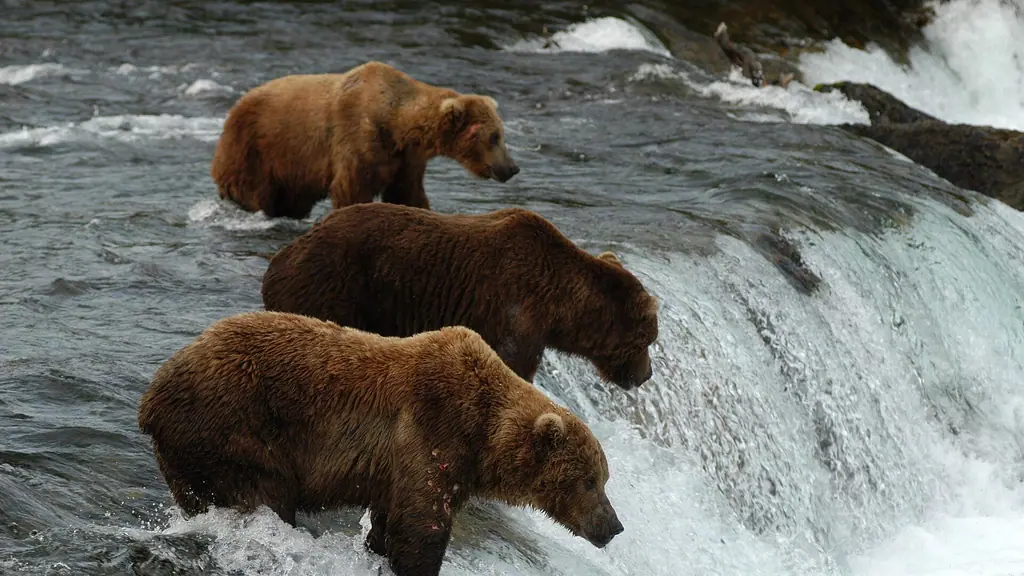
A fourth-grade class tunes in to the famous Alaskan bear cam on a gray February morning and finds only last summer's highlights; the bears are hibernating. The volcano cam they try next shows nothing but fog. Live webcams are wonderful classroom tools, but they reward a little planning.
Done well, a live camera turns an abstract topic into something students can observe and question in real time: animal behavior, eruptions, weather systems, the deep sea, the Sun. This page lists reliable cameras run by parks, museums, zoos and science agencies, explains how to plan around seasons and time zones, and offers lesson structures that move students from watching to asking scientific questions.
Why live cameras work in class
A live feed offers something a video cannot: uncertainty. Nobody knows whether the bear will catch a fish, whether the geyser will erupt in the next ten minutes or what the remotely operated vehicle will find on the next dive. That uncertainty is exactly what scientific observation is like. Cameras run by research and conservation organizations also come with context: rangers, scientists and educators who answer questions, explain what viewers are seeing and archive notable moments.
Reliable cameras by topic
Wildlife and national parks. The National Park Service lists webcams across the park system, from eagle nests to geyser basins. The best known are Katmai National Park's bear cams on the Brooks River in Alaska, run with the nonprofit explore.org. The park says the cams show bears live during summer and early fall, typically late June through early October, with highlights in the off-season. Each fall, explore.org and the park run Fat Bear Week, a single-elimination online vote celebrating the bears' weight gain before hibernation, which pairs naturally with lessons on energy and adaptation.
Zoos and aquariums. Smithsonian's National Zoo streams animal cams featuring giant pandas, elephants, lions and naked mole-rats, and offers printable Animal Cam Bingo cards for younger viewers. Monterey Bay Aquarium streams cameras on its jellies, sharks and sea otters, and other accredited aquariums run similar cams.
Birds. The Cornell Lab of Ornithology's Bird Cams follow nests and feeders through the breeding season, often with researchers commenting on behavior.
Volcanoes and geysers. The U.S. Geological Survey's Hawaiian Volcano Observatory maintains webcams on Kīlauea, including summit and rift-zone views, and Hawaiʻi Volcanoes National Park links to them. Yellowstone's webcams include a live view of Old Faithful, whose eruptions the park predicts.
Oceans. The nonprofit Ocean Exploration Trust broadcasts live video from remotely operated vehicle dives aboard its research ship Nautilus, often with scientists narrating. NOAA Ocean Exploration also livestreams expeditions when ships are at sea.
Weather and space. NOAA's GOES imagery viewer shows near-real-time satellite views of clouds and storms over the Americas. NASA streams launches, spacewalks and views from the International Space Station through NASA Live and NASA+, and the SOHO mission posts the latest images of the Sun. Our pages on weather and meteorology and astronomy and space science list more data sources.
Plan around seasons, time zones and darkness
Checklist before class: Check that the cam is live today, not seasonal highlights. Convert the camera's local time to yours; Alaska and Hawaii are hours behind most U.S. classrooms, and a cam may be dark during your school day. Read the operator's schedule for ranger chats or expedition dives. Have a recorded highlight or still image ready as a backup. Test sound and full-screen display on the classroom projector.
Seasonal patterns are a lesson in themselves. Why are bear cams quiet in winter? Why do nest cams go live in spring? Why are some ocean streams only available for a few weeks a year? Let students predict, then check.
Lesson structures that work
1. Structured observation log. Give students a simple table: time, what I see, what I hear, what I think is happening, and a question. Watch for ten minutes. Afterward, separate observations ("the bear stood at the top of the falls") from inferences ("the bear was waiting for fish").
2. Behavior tally. Choose two or three behaviors, such as feeding, resting and moving, and have groups tally them in timed intervals. Combine the class data in a chart and discuss sample size and observer bias.
3. Predict and test. Before watching a geyser or a feeding schedule, students predict what will happen and when. Compare predictions with what they see and with the operator's own explanations.
4. Then and now. Revisit the same camera across weeks or seasons, such as a nest from egg to fledging or a volcano's activity, and build a class timeline with screenshots and dates.
5. Ask an expert. When a cam hosts live ranger or scientist chats, prepare questions in advance. Students learn that scientists also say "we don't know yet."
6. Connect to data. Pair a camera with the numbers behind it. A volcano cam sits alongside the observatory's eruption updates; a satellite loop sits alongside a weather forecast; a geyser cam sits alongside the park's eruption predictions. Students can check whether what they see matches what the data say, and discuss why the two sometimes disagree, such as fog hiding an eruption or a storm moving faster than forecast.
For younger grades, keep sessions short and focused on one or two things to notice, such as counting animals or describing the weather on screen. Older students can design their own observation protocols and compare results across groups.
Try it: Watch the same live camera for five minutes on three different days at the same time. Record conditions such as light, weather and activity each time, and write one testable question your observations raise.
Safety and supervision
Safety: Preview every stream before showing it. Many cams appear on video platforms with live chat and recommended videos alongside; use full-screen mode or the operator's own page, and turn chat off where possible. Wildlife cams show real predation, injury and death, so prepare younger students and be ready to switch views. Choose nature and science cameras over city street cams, which can show identifiable people. Younger children should watch with an adult rather than browsing streams on their own.
For more on choosing safe tools and settings for young researchers, see our guide to safe internet research for children. Related animal resources are on our wildlife and animal science page, and more classroom collections are on the For Teachers page.
Recommended resources
- NPS Webcams: Watching Wildlife — An entry point to webcams across the national parks, from eagle nests to wildlife viewing areas. (National Park Service; free.)
- Katmai National Park Webcams — Links to the Brooks River bear cams, ranger question-and-answer sessions and background on the bears. Live in summer and early fall. (National Park Service with explore.org; free.)
- explore.org Live Cams — A large philanthropic network of live nature cameras, including bears, eagles, ocean scenes and African wildlife, with community guidelines for chat. (explore.org; free.)
- Fat Bear Week — The annual autumn bracket-style vote on Katmai's brown bears, with downloadable brackets and bear profiles. (explore.org with Katmai National Park; free.)
- National Zoo Webcams — Live cams of giant pandas, elephants, lions and naked mole-rats, plus Animal Cam Bingo cards for young viewers. (Smithsonian's National Zoo and Conservation Biology Institute; free.)
- Monterey Bay Aquarium Live Cams — Live views of exhibits including jellies, sharks and sea otters, useful for marine biology lessons. (Monterey Bay Aquarium; free.)
- Cornell Lab Bird Cams — Live nest and feeder cameras with highlights and explanations of bird behavior from ornithologists. (Cornell Lab of Ornithology; free.)
- Kīlauea Webcams — Current views of Kīlauea's summit and rift zones from the volcano observatory's camera network. (U.S. Geological Survey; free.)
- Yellowstone Webcams — Park webcams including a live view of Old Faithful, with links to geyser eruption predictions. (National Park Service; free.)
- Nautilus Live — Live video from deep-sea dives with scientists narrating, plus educational resources between expeditions. (Ocean Exploration Trust; free.)
- NOAA Ocean Exploration Livestreams — Live and recorded video from NOAA ocean expeditions. (National Oceanic and Atmospheric Administration; free.)
- GOES Imagery Viewer — Near-real-time weather satellite imagery and loops for the Americas, excellent for tracking storms. (NOAA; free.)
- NASA Live — NASA's live coverage of launches, spacewalks and space station activities. (NASA; free.)
- SOHO Latest Images — The newest images of the Sun from the SOHO spacecraft, updated through the day. (NASA and European Space Agency; free.)
Sources
- Webcams - Katmai National Park & Preserve, National Park Service
- Webcams - Watching Wildlife, National Park Service
- Webcams, Smithsonian's National Zoo and Conservation Biology Institute
- Kilauea Webcams, U.S. Geological Survey
- About Ocean Exploration Trust, Ocean Exploration Trust